

When should you transfer inventory between warehouses instead of placing a new order?
 Gary Sahota
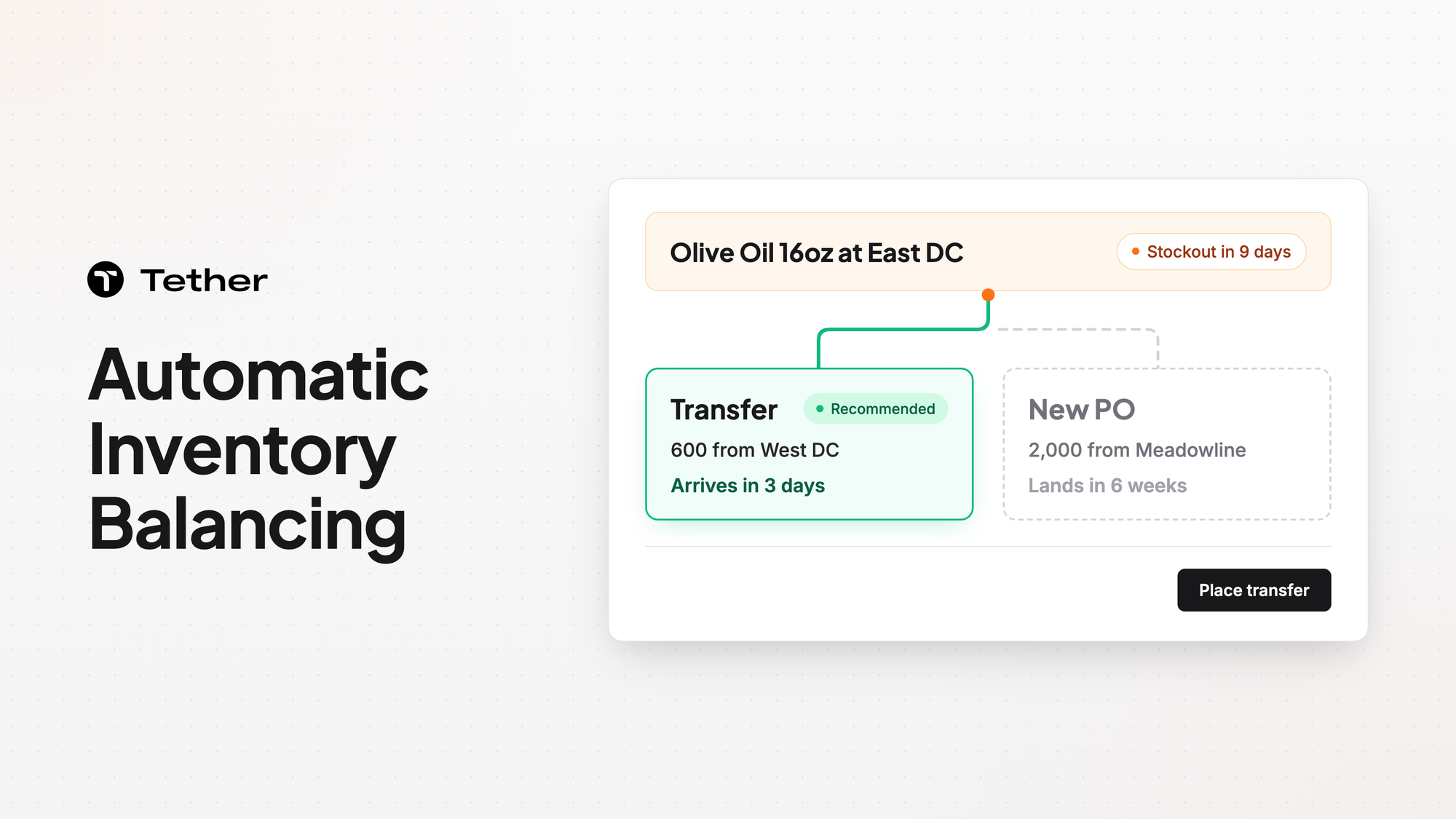
Tether predicts the stockout date and makes reorder and transfer recommendations for each SKU at each warehouse. A transfer fits when another warehouse holds sellable stock it can spare before the low one runs out. A new order fits when the whole network is short. Your team places the order.
Transfers put stock you already own where it will sell
A transfer fixes a shortage with inventory you have already paid for. Demand rarely lands evenly across a network, so one warehouse can run low on a SKU while another holds more than its own customers need. A new purchase in that spot adds units to a network that already has enough, and the extra stock still has to sell somewhere.
Stock sitting in the wrong warehouse also slows inventory turnover, which matters most in a peak season.
A transfer rebalances the network instead. It moves units from the location with spare stock to the one about to run short. When the move between your warehouses takes less time than the supplier's lead time, it also closes the gap sooner.
Tether AI recommends inter-warehouse transfers to cover a shortfall before it hits. Tether shows days of stock rather than a raw number. The health status recalculates automatically as demand fluctuates.
A transfer fits when the stock is already in your network
A transfer is the better move when one warehouse can give up units without creating a shortage of its own. Three conditions usually decide it:
- The low warehouse will run out before a new purchase order could land.
- Another warehouse holds more sellable units than its demand needs before its own next delivery lands.
- The units can move and arrive before the stockout date.
Count only sellable units at the source warehouse. Tether tracks sellable, committed, in transit, and in production stock as separate states, and committed stock is reserved for orders. If you move committed units, the transfer fixes one warehouse and leaves open orders short at the other.
Check what is already on the way before you move anything. In Tether, coverage weighs demand and incoming POs together, so stockouts get flagged while you can still act. A PO landing at the low warehouse soon may close the gap without any transfer at all.
A new order fits when the whole network is short
Place a new order when no warehouse can spare units without running short itself. When every location is tight, a transfer only moves the shortage from one place to another. Buying more is what adds units to the network.
Ordering from a supplier also lets you choose where the supply comes from. You can have Tether draft each PO to your fastest, cheapest, or most reliable supplier. You can keep multiple suppliers per product and split orders across them by your own rules.
For the reorder side, Tether drafts a PO the moment coverage hits your reorder point. Each draft already respects your supplier minimums, lead times, and preferences. Tether AI cascades a 12-month PO plan and re-plans as each order lands. You can follow each PO from draft to receipt.
Some shortfalls need a transfer and a new PO together. A transfer can cover the low warehouse in the short term while a new PO restocks the whole network.
Compare the cost of each path before you choose. Tether calculates per-unit landed cost with freight, duties, and tariffs for the purchase side. What it costs to move units between your own warehouses is a separate number your team weighs against it.
How a recommendation becomes an order in Tether
Nothing is ordered until someone on your team accepts a recommendation and places the order. That holds for a transfer between your own warehouses as much as for a purchase from a supplier. Orgs can also require a second person to agree before an order is placed, and that check is off by default. Tether keeps the settings for that step separate for purchase, production, and transfer orders.
Your team works from a ranked list. Tether puts its recommended POs, production runs, and transfer orders in order of urgency. Each one comes with a source, a destination, and a reason. On a transfer the source and destination name the warehouse that sends units and the warehouse that receives them.
You can push purchase orders to other systems while Tether keeps the full record.
Load balancing uses routing, transfers, and new orders
Keeping stock balanced across warehouses comes down to where orders ship from, where transfers move units, and where new POs land.
Order routing decides which warehouse each order draws down, so it shapes where stock runs low in the first place. Tether decides where each sales order should go under routing rules you build. Tether AI maps each sales channel to the right fulfillment warehouse and recommends primary-then-secondary warehouse routing.
Transfers then correct what routing alone cannot, such as a regional spike that drains one warehouse. A new order does part of the balancing too when it lands at the warehouse that runs short first.
Tether's inventory management is where you optimize allocation across warehouses and channels.
FAQ
Can Tether decide between a transfer and a new order for us?
Tether does the first step for you. When it predicts a stockout, it recommends a purchase or a transfer for that SKU at that warehouse. Someone on your team then accepts the recommendation and places the order.
How much manual work goes into the numbers behind a recommendation?
A 3PL or WMS connection brings sales orders, inventory levels, and purchase orders into Tether. Orders pull straight from your existing systems, so there's nothing to re-enter. Sales numbers from Shopify, Amazon, EDI, an ERP, or a data warehouse such as BigQuery or Snowflake update near real-time through lightweight delta syncs. The integrations page lists the WMS and 3PL connectors, among them ShipBob, ShipHero, ShipMonk, Extensiv (3PL Central), Stord, and Flowspace.
Does Tether move the stock between warehouses?
Tether connects to the warehouses and 3PLs you already use but does not pick or ship units. Your 3PL or WMS still runs the floor.
Which warehouse will run out first?
Tether AI predicts the exact stockout date for any product, at any warehouse. Comparing those dates shows which location runs out first and how much time a transfer has to land. Tether AI also watches every SKU at every warehouse, every hour.
What changes when we add a new warehouse?
Tether AI replans on every change, such as a new warehouse, a new SKU, or a new cost. A WMS or 3PL connection at the new location brings its inventory levels into Tether.
Can a transfer replace a purchase order we already planned?
It can if the moved units cover the same gap the PO was meant to fill, so check your open POs before you place a transfer. Separately, Tether recommends reducing or cancelling a purchase, production run, or transfer you no longer need. Your planners still decide whether to change the PO.
What if we disagree with a transfer recommendation?
You can reject it and keep the stock where it is. The reason you give is recorded with the rejection, and you can add the recommendation to a Never list.


