

Reconciling shipped versus received on sales order lines
 Gary Sahota
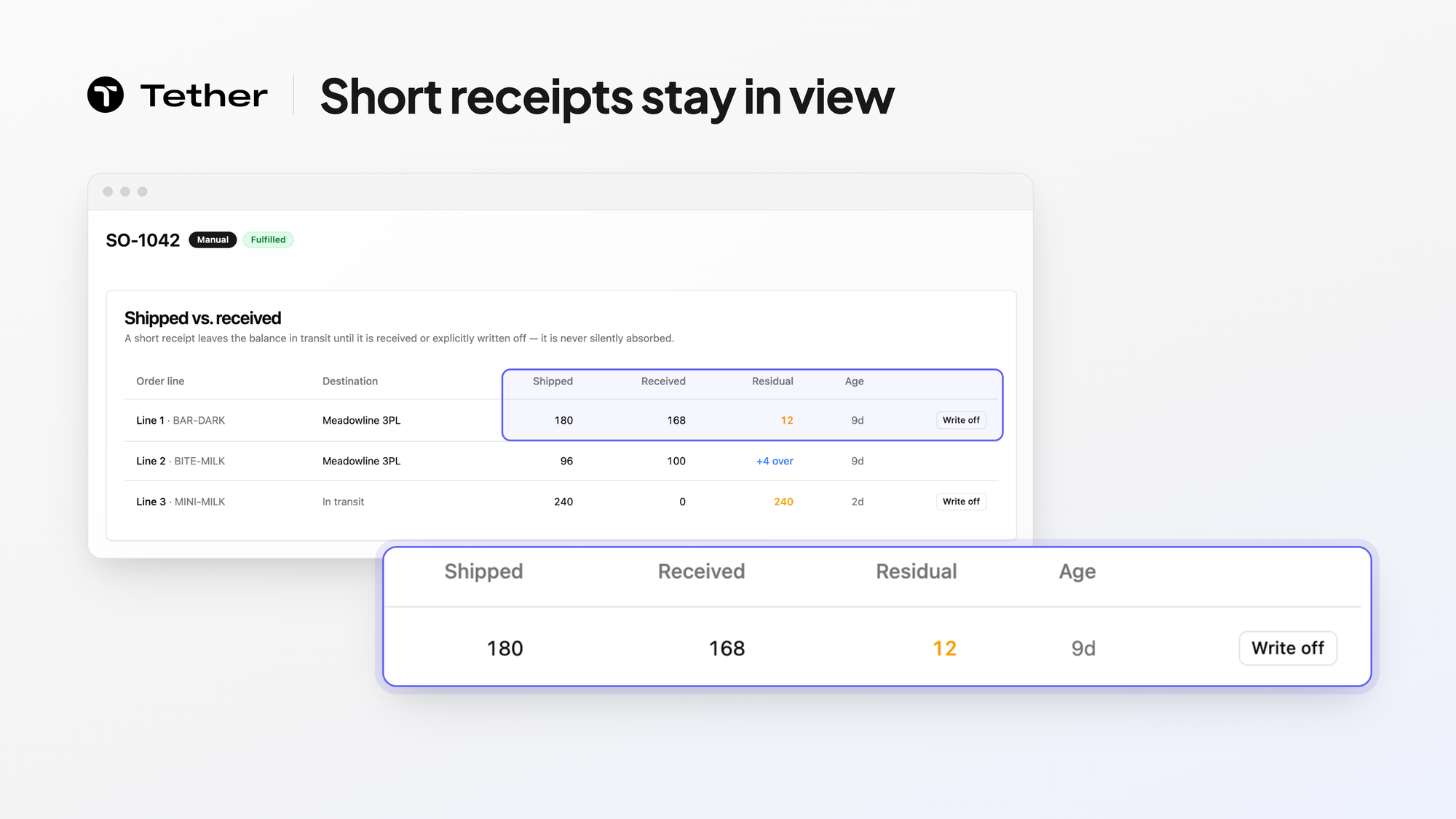
Tether shows shipped versus received on the sales order itself. The Shipped vs. received card lists each order line that has a residual or an over-receipt, with its shipped, received, and residual quantities, the destination where receipts landed, and the residual's age. A residual stays in transit until it is received or explicitly written off. Tether previews a write-off before you confirm it, and an over-receipt shows read-only.
Shipped and received drift apart in the real world
Shipped and received quantities drift apart because deliveries rarely go exactly to plan. A sales order says how many units should go out, the warehouse ships them, and on paper the same number lands at the other end. In practice, a carton goes missing between the dock and the destination, a pallet arrives damaged, a delivery comes in two parts, or someone on the receiving end counts a case wrong.
Each of those leaves a gap between what left and what arrived. The units are no longer on your shelf, and nobody has confirmed they reached the other end either. If no one is watching that gap, your picture of where stock sits is wrong by exactly those units, and the next plan you build starts from that wrong picture. Reconciling shipped versus received is how you catch the gap while there is still time to act on it.
Reconciling by hand is slow and easy to get wrong
Reconciling by hand is slow, and it tends to break in the same few ways. Without one place to compare the two numbers, the work usually means pulling a shipping report from one system and a receiving report from another, then matching them line by line in a spreadsheet. Common slips include:
- Reports pulled on different days
- A quantity typed in wrong
- A lookup formula copied one row off
- A line missed while scrolling
Because the work is tedious, it often waits until month end or until a customer questions an invoice. By then the shipment is weeks old, the people who handled it have moved on to other orders, and the paper trail is harder to follow.
The card lists the lines with a residual or an over-receipt
The Shipped vs. received card on a sales order lists only the order lines that have a residual or an over-receipt. The shipped, received, and residual quantities sit side by side on each of those lines, so you can read each gap on the order instead of matching two reports. For each line on the card, you see:
- The shipped quantity
- The received quantity
- The residual still outstanding after receipts and write-offs
- The destination where receipts landed
- The age of that residual
A line with no residual and no over-receipt stays off the card, so you do not scroll past lines that are already settled. The Age column tells you how long each residual has been open. A residual that has been open for weeks calls for a different follow-up than one that opened yesterday, so on an order with several short lines you can start with the oldest gap.
A residual stays open until it is received or written off
Units behind a residual stay in transit until they are received or someone on your team explicitly writes them off. Until one of those happens, the line stays on the card with its residual in transit.
Receiving the missing units when they turn up clears the residual. When they are not coming, you write the residual off instead. Tether shows you a preview of the write-off first, and the write-off happens only once you confirm it.
When more units arrive than shipped, the line appears on the card as an over-receipt, and the card shows it read-only.
Why Tether is well placed to show this comparison
Tether is well placed to show this comparison because your sales orders, your warehouses, and your stock view already live in one system. Sales orders flow in from Shopify, Amazon, TikTok, and wholesale EDI, and Tether routes each one to the right warehouse, as the order management page describes. Tether connects to the warehouses and 3PLs you already use, and your 3PL or WMS still runs the floor.
The same system that holds the Shipped vs. received card also brings your own warehouses and your 3PLs into one stock view through inventory management. If an order has a residual or an over-receipt, the comparison is already on it when you open the order.
FAQ
Does a residual mean the units are lost?
A residual only means the received quantity has not caught up with the shipped quantity. Treat it as a question to answer rather than a loss to book. The age and destination on the line help you decide where to look first.
How do I know who to follow up with?
When part of a line has been received, the Destination column shows where those receipts landed, which points you to the location to ask about the rest. When nothing has been received yet, start with your carrier, since the units may still be on the road.
Can I write off an over-receipt?
The card shows an over-receipt read-only, so it is there to review rather than to act on from the card. It sits next to any short lines on the same order, which helps when one line came in long and another came in short.


