

How do you set a reorder point for a consumer brand?
 Gary Sahota
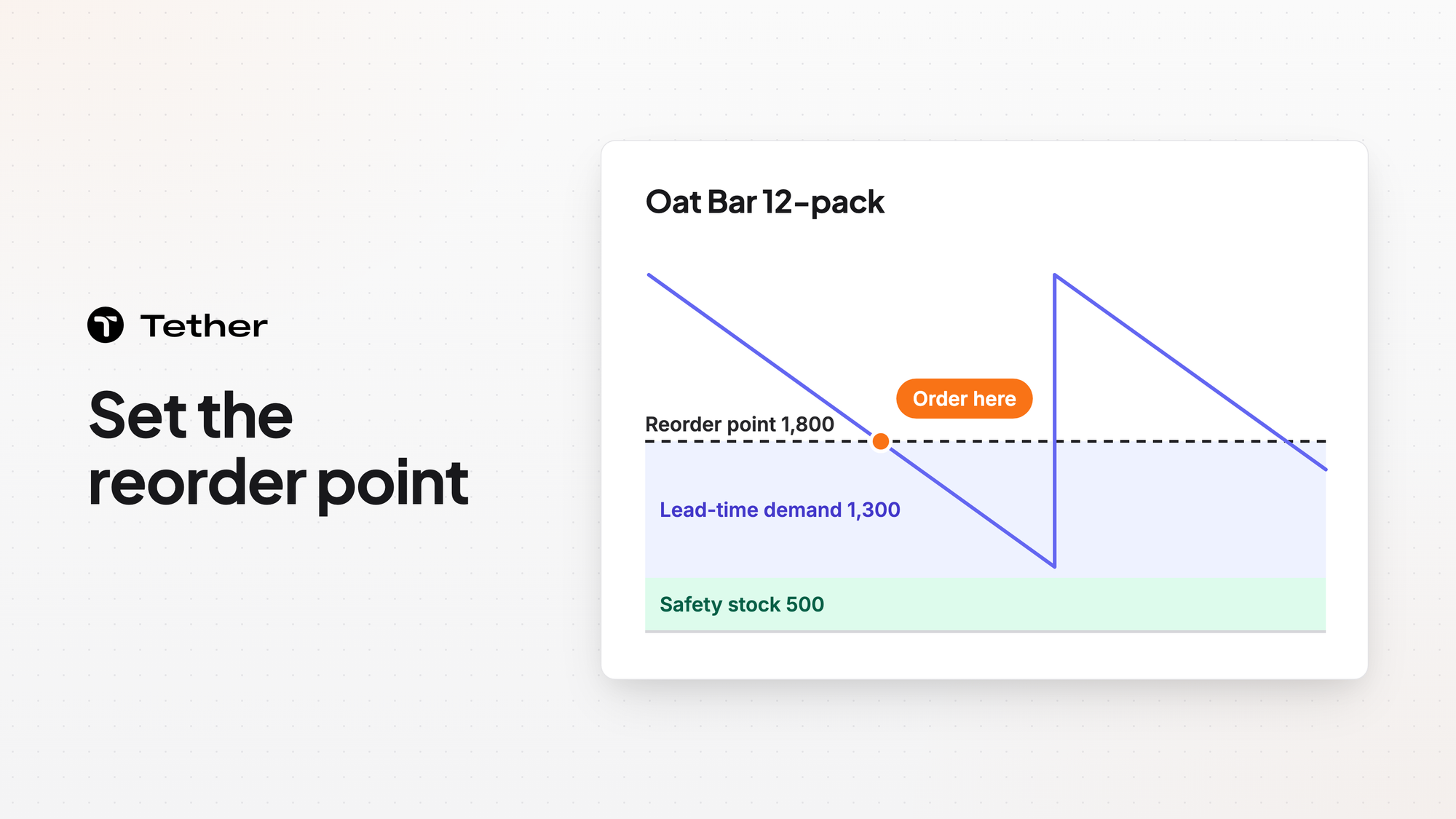
A reorder point is the stock level that triggers the next order for a SKU. Set it to the demand you expect during the supplier lead time plus safety stock. Tether drafts a purchase order once your coverage reaches your reorder point. Tether also lets you base every reorder on what suppliers have actually delivered.
The reorder point formula in words
A reorder point equals the demand you expect over the supplier lead time plus your safety stock. Each part answers a different question.
- Lead-time demand is what you expect to sell between placing an order and having the new stock ready to sell. You get it by adding up your forecast over the days the supplier takes to deliver. When sales are steady that equals your daily sales rate times the lead time in days.
- Safety stock is the stock you plan to still hold when the new order lands. It absorbs sales that run above forecast and deliveries that arrive late.
When your available stock falls to that level you place the order. If your forecast and lead time both hold then the new stock arrives just as you dip into safety stock.
The formula assumes you check stock all the time. If you review stock on a set day each week then add the demand for that review period too because stock can fall below the trigger between checks.
Compare the reorder point with your inventory position rather than with what sits on the shelf. Inventory position is sellable stock plus open orders not yet received minus units already promised to customers. A check against shelf stock alone can trigger a second order while the first one is still in transit.
Start with the lead time you actually get
The lead time in the formula should run from placing the order to having sellable stock, measured from your real deliveries. Treat a quoted lead time as a starting point until deliveries confirm it.
Break it into parts because each part moves for its own reasons:
- Production time runs from the order to finished goods at the supplier. It stretches when the supplier is busy or short of materials.
- Shipping time runs from pickup to your warehouse door. It stretches with carrier delays and customs checks.
- Receiving time covers unloading, counting, and putting stock away until it can be sold.
- A supplier closure for a holiday adds time to any order that overlaps it.
Use the lead times from recent orders and watch which way they are moving. A supplier that has drifted later over several orders needs a higher reorder point before the next order goes out.
In supply planning you can spot trends in past lead times and set expectations you can keep. Tether keeps production time and shipping time as separate figures so each estimate holds up. You can also plan around supplier holidays so a closure never catches you off guard. Supply planning in Tether respects MOQs, lead times, batch sizes, and pallet counts.
How much safety stock to hold
Hold more safety stock where a stockout costs more or the inputs are less certain. Four things push it up:
- Demand that swings from week to week or from one channel to another
- A long lead time that gives sales more time to run ahead of plan
- A supplier whose deliveries vary or have been running late
- A SKU whose stockout hurts most such as a best seller or a product wholesale accounts reorder on a schedule
Steady sellers from reliable suppliers can run on less. Some slow movers can run on less too when running short costs less than the cash tied up in extra units.
Safety stock is what covers a late delivery. In purchase order management Tether flags you the moment a delivery date slips, long before it becomes a stockout.
There are two common ways to size it. The simple way adds a fixed number of extra days of demand per SKU or per group of SKUs. The statistical way sizes the buffer from how much demand and lead time have varied in the past and the service level you choose. Service level here means how rarely you accept running out while an order is on its way. Either way every unit of safety stock is cash on the shelf and slows your inventory turns.
Set reorder points per SKU and per warehouse
A reorder point belongs to one SKU at one location. Each warehouse sells at its own rate and may be supplied on a different lead time. A single figure for the whole network fires too late for the busiest location and too early for the quietest.
Review reorder points whenever an input changes:
- Before a season or a promotion lifts the sales rate
- When a supplier's lead times start trending later or earlier
- When you switch suppliers or move to a different shipping mode
- When a new product starts taking sales from an existing SKU
Tie each reorder point to the forecast rather than to a fixed average so it rises before a peak and falls after it.
The reorder point sets timing while supplier rules set quantity
The reorder point decides when to order and your supplier's terms shape how much. A minimum order quantity, a batch size, or a full pallet can push an order above what the coming weeks of demand need. That extra stock keeps you above the trigger for longer, which is fine as long as you plan for the cash.
In Tether the draft that appears at your reorder point already respects your supplier minimums, lead times, and preferences. Coverage there means the days of stock you have left.
For more on handling several suppliers per product read how Tether handles supplier lead times and purchase orders.
FAQ
How is a reorder point different from days of cover?
Days of cover measures how long the stock you hold will last at the expected sales rate. The reorder point is the level of stock or cover at which you place the next order. Cover tells you how close a SKU is to its reorder point.
Should a reorder point be set in units or in days?
Either works if everyone uses the same convention. Units match what the warehouse counts. Days divide stock by the sales rate so one rule reads the same way for fast and slow SKUs.
What happens if your reorder point is too low or too high?
Too low and the new order lands after the shelf is already empty. Too high and you carry stock longer than you need to, which ties up cash and warehouse space.


